How to Upgrade Your Phone for Better Video Content
You do not necessarily need an expensive camera to create better video content. Modern smartphones are already capable of producing impressive footage, especially when they are paired with a better filming setup.
Whether you are making YouTube videos, TikToks, product demonstrations, travel content, interviews, or social media clips, small improvements to stability, lighting, audio, and composition can make your videos look considerably more polished.
Here are some simple ways to upgrade your phone setup and get more professional-looking results.
1. Start With Better Stability
One of the quickest ways to make phone footage look amateur is excessive shaking.
Even if your phone has built-in stabilization, holding it with one hand while walking, panning, or trying to frame a subject can still introduce unwanted movement.
Using two hands helps, but a dedicated phone rig can give you a much more secure way to hold the device.
This becomes especially useful when filming longer videos, moving shots, product demonstrations, or scenes where you need to slowly reposition the camera.
A stable shot immediately feels more intentional.
2. Turn Your Phone Into a Proper Video Rig
One of the most useful upgrades for frequent smartphone creators is a cage or rig that gives you better control over the phone while also creating places to attach other accessories.
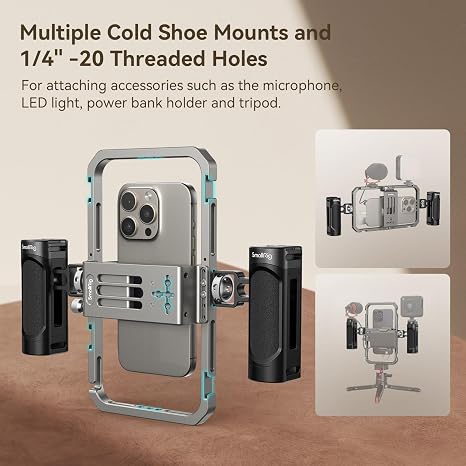
The SmallRig Universal Phone Cage Smartphone Video Rig Kit – 4121 is designed specifically for this kind of setup.
The kit includes a universal mobile phone cage along with two lightweight side handles, giving you a more substantial two-handed grip when filming. SmallRig also designed the cage with multiple mounting points so creators can expand the setup with accessories such as a microphone, video light, additional handle, tripod, or other compatible equipment. SmallRig
That expandability is what makes a phone cage useful.
Instead of balancing a light, microphone, and phone separately, the cage becomes the foundation of the filming setup. You can start with just the phone and handles and add equipment later as your needs change.
For creators who regularly shoot handheld video, the dual handles can also make the phone easier to control than simply gripping the edges of the device. SmallRig specifically positions the 4121 setup for handheld filming, vlogging, and similar creator use. SmallRig
3. Pay More Attention to Lighting
Better lighting can improve phone footage more dramatically than buying a newer phone.
Phone cameras perform especially well when they have plenty of clean, flattering light to work with.
Whenever possible, start with natural light.
Position yourself or your subject near a window and face toward the light rather than placing the window directly behind you. This can create a bright, even image without requiring any additional equipment.
If you regularly film at night or in darker rooms, consider adding a small LED video light.
A phone cage becomes particularly useful here because you can mount compatible lighting directly to the rig rather than finding somewhere else to position it. The 4121 cage provides expansion points intended for accessories including video lights. SmallRig
You do not necessarily need an extremely bright light. Even a modest amount of controlled light placed close to your subject can make a noticeable difference.
4. Upgrade Your Audio
People will often tolerate video that looks slightly imperfect.
Poor audio is much harder to ignore.
Your phone’s built-in microphone can work well when you are close to the device and filming in a quiet room, but it becomes less effective when you move farther away or introduce background noise.
An external microphone can help make speech clearer and more consistent.
Depending on what you film, that might mean a small shotgun microphone mounted near the phone or a wireless microphone attached to the person speaking.
Again, this is where a modular phone rig helps. A cage such as the SmallRig setup gives you mounting options for a microphone rather than forcing you to hold or separately position every piece of equipment. SmallRig
If your content involves talking, tutorials, reviews, interviews, or demonstrations, upgrading audio should be near the top of your list.
5. Use the Rear Camera Whenever Possible
The front-facing camera is convenient because you can see yourself while recording, but the rear cameras on many phones provide better overall image quality and more lens options.
If you are filming something that does not require constant self-monitoring, try using the rear camera.
A phone rig can make this easier because you can place the phone on a tripod, frame the shot, and leave it in position rather than constantly handling the device.
For solo creators, you may need to record a short test clip first to check framing.
It takes slightly more preparation, but the improvement in image quality can be worth it.
6. Clean Your Camera Lens
It sounds almost too simple, but this is one of the easiest upgrades you can make.
Phones spend all day in pockets, bags, hands, and on tables. The camera lenses quickly collect fingerprints, oil, dust, and other residue.
That thin layer of grime can make footage look hazy, reduce contrast, and create strange flares around lights.
Before filming, quickly wipe the lens with a clean microfiber cloth.
It takes a few seconds and can noticeably improve the image.
7. Lock Your Focus and Exposure
Automatic camera settings are convenient, but they can sometimes become distracting during video.
For example, the phone may suddenly brighten or darken the image when something moves through the frame. Focus may also jump between the subject and the background.
Many smartphone camera apps let you lock focus and exposure before recording.
Using these controls can help keep the look of your footage consistent throughout the shot.
This is particularly helpful when filming products, interviews, cooking videos, or other scenes where the camera remains in approximately the same position.
8. Think About Your Background
Better video is not only about the camera.
Look at everything behind your subject before pressing record.
Remove distracting clutter, straighten objects, and avoid having bright windows or lamps directly behind the person you are filming.
You do not need an elaborate studio.
A clean wall, bookshelf, desk, workshop, kitchen, or naturally interesting outdoor location can all work well.
The goal is simply to make sure the background supports the video instead of competing with it.
9. Use a Tripod When the Camera Does Not Need to Move
Handheld footage is useful when movement adds something to the video.
Otherwise, a tripod is often better.
For product demonstrations, talking-head videos, cooking content, tutorials, or interviews, keeping the camera completely still makes the video easier to watch.
A phone cage also gives you more flexibility here because the same setup you use handheld can be incorporated into a larger filming system.
SmallRig’s 4121 cage is designed with accessory mounting options that can support different creator configurations rather than limiting you to one way of filming. SmallRig
10. Create a Setup You Can Use Repeatedly
One of the biggest barriers to making content consistently is having to rebuild your setup every time you want to film.
If possible, create a basic system that you can assemble quickly.
Your phone, cage, handles, microphone, light, and tripod can become a compact filming kit that is ready whenever you need it.
This is one of the biggest advantages of starting with something modular like the SmallRig Universal Phone Cage 4121. The basic kit gives you the cage and dual handles, while the mounting system leaves room to expand with other accessories later. SmallRig
You can keep the setup simple for quick social videos or build it out when you need more lighting, better audio, or a tripod.
Better Videos Do Not Require a New Phone
Before spending money on a new smartphone or dedicated camera, improve the setup around the phone you already own.
Start with stability. Improve your lighting. Pay attention to audio. Clean your lens, use better camera settings, and create cleaner backgrounds.
For anyone who frequently films handheld content, the SmallRig Universal Phone Cage Smartphone Video Rig Kit – 4121 is a practical way to turn a phone into a more controlled and expandable filming setup.
The goal is not to make your smartphone unnecessarily complicated.
It is to remove the limitations that make filming harder.
With a stable rig, better light, clearer audio, and a little more attention to composition, the phone already in your pocket can become a surprisingly capable content-creation tool.