
What to Look for in an Affordable Laptop for Everyday Work

Buying a laptop for everyday work does not have to mean spending a huge amount of money.
For many people, the goal is not to run advanced 3D software, edit feature-length videos, or play demanding games. You may simply need something dependable for email, spreadsheets, web browsing, video calls, cloud-based tools, documents, and general business tasks.
That makes shopping for a budget-friendly laptop less about chasing the most powerful specifications and more about choosing the right balance of performance, screen size, memory, storage, and usability.
Here are some of the most important things to look for when choosing an affordable laptop for everyday work.
1. Start With What You Actually Need It to Do
Before comparing processors and storage sizes, think about the tasks you will realistically perform.
For everyday business use, that might include:
- Email and web browsing
- Microsoft Office or Google Workspace
- Video meetings
- Accounting or invoicing software
- Online research
- Managing files and documents
- Working inside browser-based business platforms
If that sounds like your normal workload, you probably do not need the same type of computer someone would buy for professional video production or engineering software.
Choosing based on your actual needs can help you avoid paying for performance you may never use.
2. Look for Enough Memory for Multitasking
RAM is one of the most important specifications for everyday productivity.
When you have several browser tabs open while also using email, spreadsheets, and another program, your computer needs enough memory to keep everything running smoothly.
For basic everyday work, 8GB of RAM is a reasonable starting point.
It gives you enough room for common multitasking without immediately moving into the higher price range associated with 16GB or more.
DDR5 memory is also a newer generation of RAM, so seeing DDR5 in an affordable laptop can be a nice bonus.
If you regularly work with extremely large files, advanced creative software, or heavy multitasking, you may want more memory. But for general office work, 8GB can make sense.
3. A Full-Size Screen Can Be Worth It
Screen size matters more than people sometimes realize.
A very small laptop may be easier to carry, but a larger display can make spreadsheets, documents, and side-by-side browser windows much easier to work with.
A 15.6-inch screen is a popular middle ground.
It gives you enough room to comfortably work at a desk while still being portable enough to move between home, an office, or a meeting.
A Full HD display is another feature worth looking for because it provides more workspace and sharper text than lower-resolution screens.
If you spend several hours a day working on your laptop, the screen is one area where comfort can make a real difference.
4. Consider a Practical Business Laptop Like the Lenovo 15.6-Inch FHD Model
If you are looking for a straightforward computer for everyday work, the Lenovo Business 15.6″ FHD Laptop is one option worth considering.
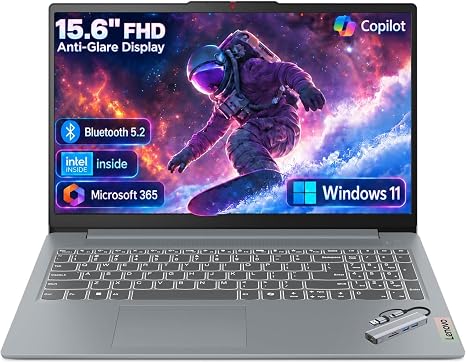
It combines a 15.6-inch Full HD display, an Intel processor, 8GB of DDR5 memory, and 128GB of storage in a configuration aimed at practical day-to-day computing.
The larger screen makes it well suited for common tasks such as working in spreadsheets, writing documents, managing email, browsing the web, and handling other routine business activities.
The 8GB of DDR5 memory also gives it enough capacity for typical multitasking, such as keeping several browser tabs open while working in office applications.
Its 128GB of storage is more modest than what you would find in a higher-end laptop, but that may be perfectly adequate for someone who relies heavily on cloud storage, Google Drive, OneDrive, Dropbox, or browser-based business tools.
That is an important distinction when shopping for an affordable machine.
Not everyone needs a large internal drive. If most of your files already live in the cloud, choosing a laptop with less storage can be one way to keep the overall price lower without sacrificing the features you actually use every day.
For a small business owner, student, remote worker, or anyone who mainly needs a practical everyday computer, this type of Lenovo configuration can be a sensible budget-conscious option.
5. Pay Attention to Storage Capacity
Storage is another specification that should match the way you work.
A 128GB drive is relatively small by modern standards, but whether that matters depends on what you store locally.
If you mainly work with:
- Word documents
- PDFs
- Spreadsheets
- Web applications
- Cloud-based files
then you may not need much local storage.
On the other hand, photographers, videographers, designers, and anyone storing large media libraries will probably want substantially more capacity.
External drives and cloud storage can also make a lower-capacity laptop more practical.
The important thing is knowing your habits before buying.
6. Do Not Ignore Keyboard Comfort
The keyboard may not appear on the specification sheet as prominently as the processor, but it matters if you type every day.
If possible, look for a laptop with a comfortable layout and enough spacing between the keys.
A larger 15.6-inch laptop may also provide more room for the keyboard compared with very compact models.
For someone writing emails, reports, proposals, or spreadsheets for hours at a time, keyboard comfort can matter more than a small increase in processing power.
7. Think About Portability Versus Screen Space
There is always a tradeoff between portability and comfort.
Smaller laptops are easier to carry around, while larger models usually give you more workspace.
If your computer spends most of its time on a desk, a 15.6-inch model may be the better choice.
If you travel constantly and work from airports, coffee shops, or small tables, a smaller laptop may be more convenient.
Neither option is universally better. It depends on where you work.
8. Check the Ports You Use Most
Before buying, think about what you regularly connect to your laptop.
That may include:
- A mouse
- External monitor
- USB drive
- External hard drive
- Webcam
- Keyboard
- Headset
Make sure the laptop you choose has the connections you need, or be prepared to use an adapter or USB hub.
This is especially important if you plan to build a home-office setup around the laptop.
9. Battery Life Matters More for Mobile Workers
If the laptop will mostly stay plugged in at a desk, battery life may not be your biggest concern.
But if you move between meetings, classrooms, coffee shops, or different rooms throughout the day, battery performance becomes much more important.
Manufacturer battery estimates can also vary based on brightness, workload, Wi-Fi use, and other settings, so it is worth looking at real-world reviews before making a decision.
10. Do Not Pay for Features You Will Never Use
This is one of the easiest ways to overspend on a laptop.
A high-end graphics card, enormous storage drive, or premium processor may sound impressive, but those upgrades can add hundreds of dollars to the price.
If your normal workload consists of email, browser tabs, spreadsheets, documents, and video meetings, your money may be better spent on the features that affect you every day: a comfortable screen, enough memory, a reliable keyboard, and the right size.
Affordable Can Still Be Practical
A good everyday laptop does not need to be the fastest computer available.
It simply needs to handle your normal workload without becoming frustrating.
For many people, that means looking for around 8GB of memory, a comfortable Full HD display, enough storage for their workflow, and a processor capable of handling routine productivity tasks.
A model such as the Lenovo Business 15.6″ FHD Laptop with an Intel processor, 8GB DDR5 memory, and 128GB of storage fits that type of use well, especially for someone who wants a straightforward computer for everyday work without paying for unnecessary extras.
The best affordable laptop is not necessarily the one with the longest list of specifications.
It is the one that gives you the features you will actually use every day at a price that makes sense.